Jobs in Pakistan: http:jobs.pakcat.com/

Showing posts with label Blogger. Show all posts

Monday, December 28, 2015

An update on Google Friend Connect in Blogger

In 2011, we announced the retirement of Google Friend Connect for all non-Blogger sites. We made an exception for Blogger to give readers an easy way to follow blogs using a variety of accounts. Yet over time, we’ve seen that most people sign into Friend Connect with a Google Account. So, in an effort to streamline, in the next few weeks we’ll be making some changes that will eventually require readers to have a Google Account to sign into Friend Connect and follow blogs.

As part of this plan, starting the week of January 11, we’ll remove the ability for people with Twitter, Yahoo, Orkut or other OpenId providers to sign in to Google Friend Connect and follow blogs. At the same time, we’ll remove non-Google Account profiles so you may see a decrease in your blog follower count.

Blogger Logo
We encourage you to tell affected readers (perhaps via a blog post), that if they use a non-Google Account to follow your blog, they need to sign up for a Google Account, and re-follow your blog. With a Google Account, they’ll get blogs added to their Reading List, making it easier for them to see the latest posts and activity of the blogs they follow.

We know how important followers are to all bloggers, but we believe this change will improve the experience for both you and your readers.
Pakistani Google on Facebook
Join us at Facebook : http://www.facebook.com/pakgoogl

Thursday, December 17, 2015

Highlight the posts in Blogger that matter the most

As bloggers, we all know how important it is to post frequently in order to encourage readers to come back. Of course, the more you post, the more quickly your posts slip down into the archives, making it harder for your readers to discover everything you’ve posted that they might be interested in.


To help make it easier to showcase the posts you want your readers to see, we’ve created a new gadget called Featured Post. With Featured Post, you can choose posts you’ve shared on your blog and highlight them wherever you’d like.


Whether you’d like to re-share that delicious holiday recipe from a few years back, spotlight a can’t-miss promotion you’re running, or just revive something quirky from the archives, the Featured Post gadget is a simple way to show off the content that matters most.


To try it, just head to your Layout tab, add a gadget, and select ‘Featured Post’. You’ll be able to place the gadget wherever you’d like on your blog and then choose the post you’d like to show. If you’d like to highlight something new, you can change the post you feature at any time.


Happy blogging!

Tuesday, July 28, 2015

How to remove or hide or disable the navbar on blogger


Go to Design>Edit HTML in your Blogger dashboard
Using your browser's search function, locate the closing </b:skin> tag in your template's HTML markup.
Immediately before this line, paste the following section of code:


#navbar-iframe, #navbar, .navbar {height:0px; visibility:hidden; display:none; margin: 0 !important;}

Click Preview to see the changes as the way it should, then click "Save".
That's all!

Thursday, March 7, 2013

Google Play turned a year old

Google Play celebrated first birthday on Wednesday and the Android-focused rival to Apple's online iTunes shop celebrated with deals on books, games, music, movies and apps. You can shop google play on the web. Choose from over 500,000 apps & games and your selections will be instantly available on your android phone or tablet.
Happy first birthday Google Play. Join us on +Blogs of urhabib 

Monday, November 19, 2012

New and improved Blogger mobile apps

Inspiration for a new post can happen at any place and time: on the couch, while shopping, at a game, or in the kitchen. Fortunately, mobile devices enable you to stay connected wherever you are.

With that in mind, we just launched updated apps for both Android and iOS. The updated apps include a visual facelift and other features which make it easier for you to create and share -- wherever your imagination runs wild. Some of the more notable improvements include:

  • Landscape support for composing posts
  • Sharing to Google+
  • Ability to view a scheduled post time
  • International support in 30+ languages
  • iPad support

We hope you enjoy these improvements, and keep writing great blog content on the go.
Get Blogger in the Play store to get the latest on your Android phone or the App Store for iOS devices.

Wednesday, July 18, 2012

Customize your blogger posts' adresses

Earlier this year we introduced a suite of new SEO features that help ensure your blog, posts, and images are accurately indexed so they appear correctly in search results. Today we’re happy to introduce another feature that enables you to more effectively customize your search preferences - custom permalinks.

When you write a post, Blogger automatically generates a permalink based on the title of the post. Until now, blog authors have had no control of the permalink. Custom permalinks give you more control of your blog and posts. These new custom links also provide readers with more information about your post when scanning search results.

If you prefer to use a custom permalink, you can do so via the “Permalink” option in the Post Settings box.


To create your own URL for a specific post, simply select “Custom URL”, and enter your new URL in the field below. If you wrote the post in June of 2012, your new URL will look like this:

www.nameofblog.blogspot.com/2012/06/customURL.html
The bolded area is the portion of the URL that is customizable.

If the custom permalink you entered already exists, Blogger will attempt find a free one for you.

At present, the characters allowed in a custom URL are limited to: a-z, A-Z, 0-1. The only special characters available are underscore, dash, and period.

Click here to read more about custom permalinks in the Blogger Help Center.

Tuesday, May 22, 2012

Blog of "blogger in draft" is being retired

In 2007, we introduced Blogger In Draft, a special version of Blogger where new features could reach users early and let people try new things. We also introduced the Blogger In Draft blog, and for the past five years, we’ve introduced new updates and options here, often before we told the rest of the world on our official blog, Buzz.

With the recent launch of our Google+ page, we have another great way to keep you updated on new features, both for everyone and those of you who love seeing things early. To simplify the many places you can get updates, we will be retiring the Blogger in Draft blog, with this being the final post. Going forward, we’d like to invite you to follow our official blog and our Google+ page to find out what’s new with Blogger.

This doesn’t mean the Blogger In Draft service is going anywhere, so don’t fret! You’ll still get all the shiny goodness as fast as we can bring it to you. But we’ll be talking about it somewhere else.

Wednesday, January 25, 2012

Get a pulse for the posts your blog readers like most with the +1 counter

As we mentioned in our Connect to Google+ post a few weeks ago, we’ve been hard at work to bring you new ways to grow your blog and engage with your readers using Google+.

Today we’re happy to introduce the +1 counter, which allows you to quickly scan your dashboard to see which posts are most popular on your blog. Each time a reader clicks the +1 button on a post, a +1 gets added to that post's counter and their profile photo and name will appear.
The +1 button is available on all Dynamic Views posts by default, and can be enabled on most other template types by clicking on the Layout tab in your dashboard, clicking Edit in the Blog posts section, and checking the Show Share Buttons box.
If you don't have a Google+ account yet, don't fret. It's easy to join Google+ here.

Happy blogging!

Tuesday, December 13, 2011

Connect to Google Plus

Back in October we made it possible for Blogger in Draft users to use their Google+ profile on their blog. This option is now available to all Blogger users, and as a result, we're starting to roll out the first of many Google+ features.

Starting today, if you have linked your blog to your Google+ account you will be presented with a prefilled Google+ share box immediately after publishing a post. The share box will contain a +snippet of your post that you can share with your circles on Google+.


Of course, you can disable this sharing prompt at any time on the "Settings - Posts and Comments" page. And you can always share individual posts on Google+ by selecting "share" underneath the entry in your post list.


You can start using the new Share to Google+ immediately if you’ve already chosen to use your Google+ profile on your blog. If you haven’t yet made the switch, click here to get started.

If you don’t have a Google+ account you can create one here, and then log in to Blogger and follow the above instructions.

To learn more, check out our FAQs or visit our Help Forum.

Want to chat about sharing to Google+ and other Blogger features with someone from the team? Join me on the Blogger +page for a live video Hangout at 3PM PST.

Follow us on Twitter and facebook! Happy blogging!

Saturday, October 8, 2011

Tips for New Bloggers

Hi everyone! I'm Rebecca Brown, a blogger and personal stylist in the Seattle area. When I started my blog nearly 2 years ago, it was to document my attempt to wear a different dress for every day of December (sounds super interesting, right? It proves you can write a blog about anything).

I had no idea that a blog about my clothing choices would grow and become such a fun hobby! And even though I’ve been blogging for a little while, I still feel like I have so much to learn, which is what keeps blogging interesting! So, while I'm definitely far from being an expert, here are a few things that have worked for me:

1) Find a community of bloggers with similar interests. Do you like to write about video games, fashion, cooking? There are lots of great blogs on those topics already. A quick Google search for “fashion blogs” helped me round out my reading list. I always check out the blog rolls of people whose blogs I enjoy, and I also visit the blogs of folks who comment on my blog. Bottom line: interact with bloggers whose blogs you enjoy. You'll learn so much, I promise. This leads me to my next point...

2) Leave insightful comments on blogs that you enjoy - especially blogs that are in the same niche as you. Instead of just saying, "hey, nice blog, follow me please”, call out something specific that you liked about the post. Pure "followback" requests don’t really make people want to follow you.

3) Don't underestimate the importance of good pictures on your posts. The basics: Use a tripod or get a friend to photograph you if the pictures are of you. Take pictures outdoors if possible because natural light always makes pictures look better. Use post-processing (I use Picnik) to adjust the exposure, add effects, and crop to keep the focus on what you want. You don’t need a fancy camera - I use my cell phone most of the time! I wrote about this in more depth here.

4) Think about quality, rather than quantity of posts. Readers would rather see an insightful (and spell-checked!) post with original content and good pictures 2-4 times a week than hastily-written thoughts on a daily basis. Most avid blog readers follow so many blogs that if you post too often, and especially if your posts aren't high quality, you'll get passed over in favor of the other blogs on their blogroll. Plus, a great, high-quality post can continue to get you traffic for a few days - don't truncate its effectiveness by posting again the very next day.

5) Schedule your posts. I typically have a chunk of time on the weekend where I can plan out and write my 2-4 posts for the week, or at least get a rough draft in place. Blogger allows you to schedule your posts and they will automatically publish at the date/time you specify. I typically set my posts to publish around 2am to capture folks in other time zones.

6) Lastly, don't apologize for not posting more often. A blog is a fun hobby - but once you start feeling beholden to it, it stops being fun! Plus, your readers will likely not notice if you don't post for a week unless you write a post about how sorry you are for not posting!

There are so many great resources out there for bloggers looking to hone their craft. Here are a few of my favorites: -10 Things About Your Blog That Drive Me Crazy (via B at Beautifully Invisible) - Don't Be A Savage Blogger (Jamillah via Beautifully Invisible): - Build a Better Blog (via Vahni at Grit and Glamour).

I hope these tips are helpful! Blogging has been such a great part of my life - allowing me to express myself, build a community and make lifelong friends. And the great thing about it is that nearly anyone can do it. So have fun with it, don’t take yourself too seriously, and you’ll be a great blogger in no time!

[Courtesy : Blogger Buzz]

Wednesday, September 21, 2011

Images will look more beautiful in blogger

Introducing Lightbox, the latest in a series of Blogger updates aimed at giving you an improved and modernized blogging experience. Lightbox is a whole new way to interact with photos. When clicked, images now expand into a shiny new overlay that displays them at their full size for optimal viewing.

Once an image is opened in the lightbox view, any other images from the same post will now appear as thumbnails along the bottom, which can be easily browsed by clicking the arrow keys on the left or right side of the lightbox.

This feature is automatically enabled for all blogs, which means you can see the lightbox view in action right now by clicking one of the images below.


(Creative Commons photos taken from http://www.fotopedia.com/)

If you’ve custom-coded your image HTML so that images function as hyperlinks, then the lightbox view will not display and your original image hyperlink will work as expected.

Your images never looked so good!

Saturday, September 10, 2011

Announcing the Blogger app for iOS

Today we’re excited to announce the new Blogger app for iOS. With the Blogger app, you can write a new blog post and publish it immediately or save it as a draft right from your iOS device. You can also open a blog post you've been working on from your computer and continue editing it while you're on-the-go. Your blog posts are automatically synced across devices, so you’ll always have access to the latest version.

Pictures are worth a thousand words, and the Blogger app makes it easy to add photos either by choosing from the gallery or taking a new photo right within the app. You can also add labels and location to provide more details about the post.


Download the Blogger app today for iOS versions 3.2 and above in the App Store. Although the user interface is only available in English at this time, the app supports blog posts written in all languages. If you’re using an Android-powered device, you can download the Blogger app for Android from the Android Market.

Saturday, July 9, 2011

Blogger’s Updated Interface Now Available for All Draft Users

It's been an exciting couple of months seeing more and more users try out our new user interface since its debut back in April, and today we're happy to announce another major milestone in its development. As of right now, the new interface is available for all Blogger in Draft users. Again, there is no sign up or activation process required; Just visit Blogger in Draft, and you’ll find the revamped interface, all ready for your exploration!


Over the last couple of months, we’ve made significant improvements to our new user interface. First and foremost, we’ve incorporated your feedback and made numerous fixes based on that feedback. Also, we’ve updated the look and feel of our new design, inspired by Google’s newest design evolutions.


As you know, Blogger in Draft is Blogger’s equivalent to “Google Labs.” As Draft users, you get to experience our newest features, including the new design, earlier than other users. If you’re not yet on Blogger in Draft, simply go to draft.blogger.com, and check on the “Make Blogger in Draft my default” option on your dashboard.

We hope you’ll enjoy the new Blogger interface and send us your feedback by clicking on the “Send feedback” link from the navigation bar. Happy blogging!

Wednesday, June 29, 2011

Customize Your Favicon in Blogger


For many bloggers, having a custom favicon (the tiny image displayed in your browser’s window or tab) is the finishing touch that ties together the design and identity of a great looking blog. Today, we're pleased to announce that Blogger in Draft users can now add a customized favicon to their blog.
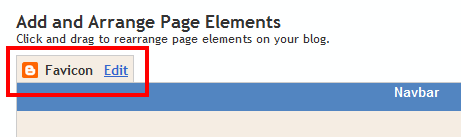
You can add a custom favicon from the Design | Page Elements tab (or, from the Layout tab if you're using the new user interface), by clicking Edit on the new “Favicon” setting above the navbar element:


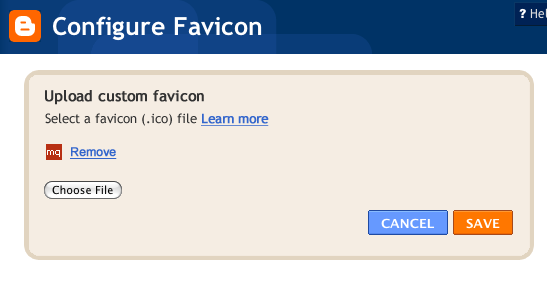
A new window will then open where you can select an image from your hard drive to replace the default favicon image. This initial launch only supports .ico files, but you can easily convert your JPEG, PNG, or other non-ico image file using your own image software. There are also many conversion tools online, and a quick Google Search brings up a handful of options such as http://www.icoconverter.com/.


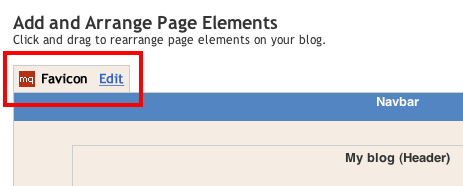
Once you’ve selected the .ico file for your favicon, click Save. We'll automatically resize the image to the correct dimensions, and you’ll then see the Page Elements updated with your selected favicon image:


When you save your template changes, you’ll see your newly-added favicon image displayed in your browser window or tab. That’s it!

In the future, we’ll add support for more non-ico image formats, so stay tuned. In the meantime, please leave us a comment below and let us know what you think and follow us on twitter.

Thursday, June 9, 2011

Announcing Blogger Mobile Templates

A few months ago we introduced mobile templates to Blogger in Draft. Today, we’re excited to announce that not only will these templates be available to everyone, we’ll be supporting all 27 Template Designer templates. We invite you to make your blog smartphone-friendly by going to the Dashboard > Settings > Email & Mobile tab and enabling the mobile template option.

Blogger mobile templates are mobile-optimized versions of our Template Designer templates. If you are using one of these templates, when you enable the mobile template option your blog will begin rendering using the mobile version of the same variant. Even if you are not using a Template Designer template, or using a heavily-customized version of one, you can still enable this feature to have your blog start rendering in a generic default mobile template that we have created.


Some of our feature highlights:

  • Preview: Get a glimpse of how your blog will be displayed by clicking on the Mobile Preview button. You can also see it on your smartphone by scanning the QR-code.
  • Automatic redirection: Viewers will see the mobile version of your blog when accessing from smartphones*.
  • Template support: We are now supporting all 27 templates. Some gadgets are also supported**.
  • Mobile ads: Mobile AdSense ads will be displayed at the top of the post pages and at the bottom of the index page if the blog has an AdSense gadget or in-line blog ads.
  • Comments and videos: Viewers on smartphone devices will be able to make comments and watch videos.
We hope you enjoy the mobile templates. As always, we would love to hear from you so please let us know what you think through our feedback form, and stay tuned for future improvements.

*WebKit-based mobile browsers are supported for this launch.
**Supported gadgets/elements in this launch: Header, Blog, Profile, AdSense, Attribution.

Thursday, June 2, 2011

Add +1 to help your site stand out

When we introduced the +1 button in March, Google search took a small step in an important direction. Search results can be more helpful, and more personal, when recommendations from the people you trust are there to guide your way.

The +1 button can help publishers, too. As potential visitors see recommendations from their friends and contacts beneath your Google search results, you could see more, and better qualified, traffic coming from Google.

Since we announced +1, we’ve gotten lots of requests from Google search users and webmasters alike for +1 buttons in more places than just search results. That’s why today we’re making the +1 button available to sites across the web. Sometimes you want to recommend a web page after you’ve visited it. After all, how do you know you want to suggest that great article on Spanish tapas if you haven’t read it yet?

We’ve partnered with a few sites where you’ll see +1 buttons over the coming days:


You'll also start to see +1 buttons on other Google properties such as Android MarketBlogger, Product Search and YouTube.

Adding +1 buttons to your pages is a great way to help your content stand out in Google search. By giving your visitors more chances to +1 your pages, your search results and search ads could show up with +1 annotations more often, helping users see when your pages are most likely to be useful.


To get started, visit the +1 button tool on Google Webmaster Central. You’ll be able to configure a small snippet of JavaScript and add it to the pages where you want +1 buttons to appear. You can pick from a few different button sizes and styles, so choose the +1 button that best matches your site’s layout.


In the common case, a press of the button +1’s the URL of the page it’s on. We recommend some easy ways to ensure this maps as often as possible to the pages appearing in Google search results.

If your site primarily caters to users outside of the US and Canada, you can install the +1 button code now; the +1 button is already supported in 44 languages. However, keep in mind that +1 annotations currently only appear for English search results on Google.com. We’re working on releasing +1 to searchers worldwide in the future.

If you have users who love your content (and we bet you do), encourage them to spread the word! Add the +1 button to help your site stand out with a personal recommendation right at the moment of decision, on Google search.

To stay current on updates to the +1 button large and small, please subscribe to the Google Publisher Buttons Announce Group. For advanced tips and tricks, check our Google Code site. Finally, if you have any questions about using the +1 button on your websites, feel free to drop by the Webmaster Help Forum.

Saturday, May 7, 2011

Updates and Fixes in Blogger

April showers bring May flowers, and updates to Blogger! Here's the run down of the latest changes available to everyone right now:

Add location info to your posts with geotagging

Geotagging has been available for a while on Blogger in Draft, but is now available to all users with today’s release. To add location information to your blog posts, simply click the Add Locationbutton in the bottom right of the new post editor. This will bring up a new window that displays the familiar Google Maps interface and you can search, drag, zoom, and drop markers for the location of your choice. 


Once you’ve settled on the location you want to add to the blog post, just click Save and the information will automatically be added to the footer section of your published post (if you don't see it, you'll probably have to enable the Location option in the Blog Post widget which is normally defaulted to 'on'.)


We’ve made a few small updates and bug fixes since the original Draft release, most notably the ability to remove location information after publishing and the addition of a placemarker for pinpointing location info.


Refreshed interface for image and video upload

Clicking the “photo” or “video” upload buttons will now display a sleeker, updated picker. We’ve also made it draggable so you can look back at the post editor if you need to.


A pair of Known Issues are now fixed
  • Users posting comments from non-Google accounts should no longer see the intermittent bX errors that occurred last week.
  • The intermittent errors which were preventing the browsing of archives via Newer / Older navigation links has been fixed.

Wednesday, April 20, 2011

Blogger, redesigned!


بلاگر! اب نے ڈیزائن میں! جلد آ رہا ہے...
As we shared before, our team has been hard at work on a brand new, next generation design for Blogger. After doing a sneak preview at the South by Southwest conference back in March, we received some great feedback from the media:


Today, we're thrilled to announce the public launch of our redesign! But please wait a second before you go check out your Blogger dashboard, because we’re planning a gradual rollout that will start with a limited set of users who visit our new feature testing ground, Blogger in Draft. At the start, only some of you (lucky draws!) can see the new design on Blogger in Draft. Over the course of the next few days and weeks we’ll be ramping up to support all Draft users. There is no sign-up or activation process required from your side; just wait, and you’ll notice your dashboard has changed to the new design when you log in to Blogger in Draft

Although our team has been hard at work cranking out tons of new features over the last year or so, it’s been a while since our user interface has had a major update so we’re very excited about Blogger’s fresh new look. However, there’s much more to the redesign than shiny new graphics and pages—we’ve essentially rewritten the entire application from scratch, using the latest web technologies that will enable us to make future updates in more agile and flexible ways.

We decided to make the new UI available to our loyal Blogger users as quickly as possible. We realize there might be some ‘rough edges’ (see this page for the known issues) but fear not, we’ll be continually updating and improving the experience until it’s ready to graduate from Blogger in Draft. Our team is also very eager to hear your feedback, so please don’t hesitate to let us know of any bugs or suggestions by clicking on the “Send feedback” link in the navigation bar (or directly on this form).

This is only the beginning of many exciting updates that we’re planning for Blogger this year, so stay tuned!

LinkWithin

Related Posts Plugin for WordPress, Blogger...